To have this feature be available to you, please email IT support
Window Hello for Business is a feature that provides a secure and convenient way to sign in to your devices and apps. Windows Hello for Business is a form of authentication that uses biometric data, such as your fingerprint or face, or a PIN, instead of a traditional password. This is typically for signing into the laptop itself
Please note that this is not a password replacement, it will still be required to sign in to certain services which are linked to your password such as Cascade & PaperCut secure print.
If you aren’t prompted automatically to set this up, you can do it manually by going to Settings --> Accounts (on the left) --> Sign-in options.
Then click on one of the available options (as below) and click on Set-up and follow the prompts on screen
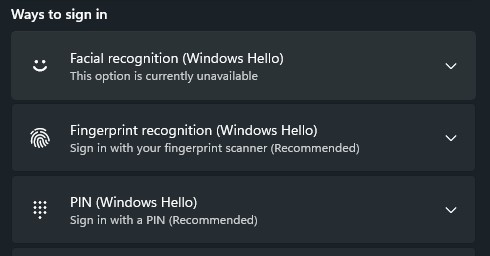
Depending on your model of laptop, you may only be able to set a PIN. If you have a fingerprint reader physically on the laptop but the option is still unavailable to you, the reader may be blank and thus not usable
Was this article helpful?
That’s Great!
Thank you for your feedback
Sorry! We couldn't be helpful
Thank you for your feedback
Feedback sent
We appreciate your effort and will try to fix the article